
Last updated 9 Oct 2026
Shoppers outside Nigeria can see your prices and pay by card in US dollars, British pounds, euros or Canadian dollars. SalesCenta takes the payment and pays you in naira.
1. Choose your currencies
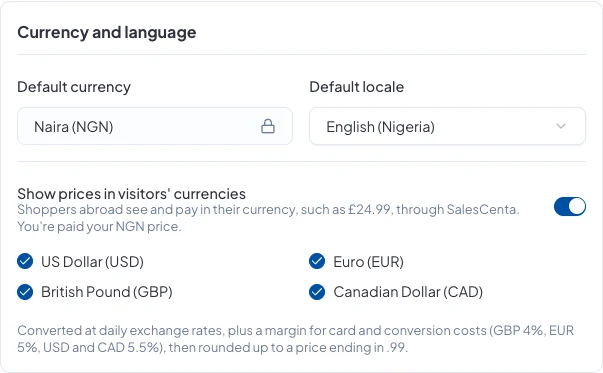
Go to Settings → Stores. Under Currency and language, switch on Show prices in visitors' currencies and tick the currencies you want: USD, EUR, GBP and CAD. Click Save changes.
2. How prices are worked out
Your naira prices are converted at daily exchange rates, plus a margin to cover card and conversion costs (GBP 4%, EUR 5%, USD and CAD 5.5%), then rounded up to a price ending in .99. You keep setting your prices in naira.
3. How shoppers pay
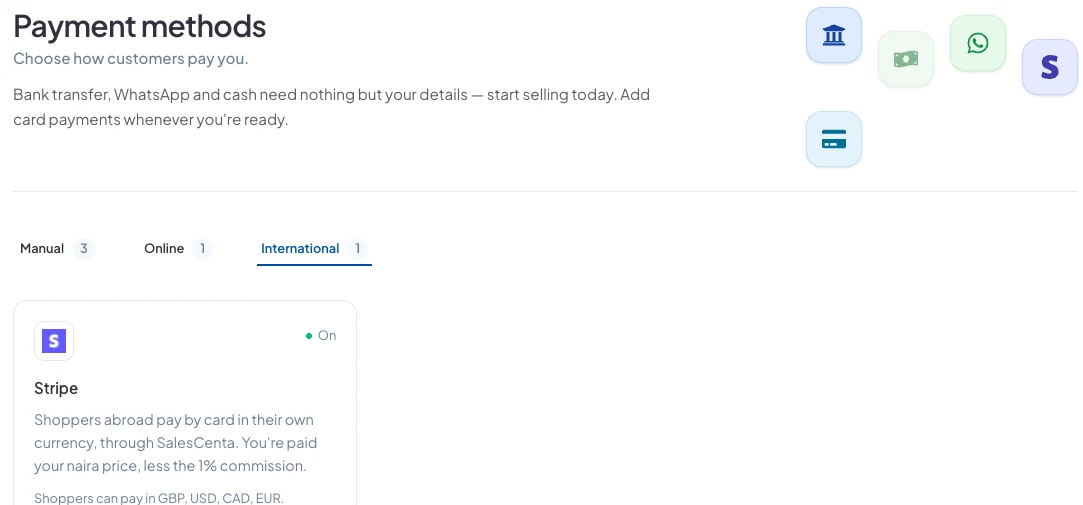
Shoppers abroad pay by card in their own currency, through SalesCenta. You'll see this under Store Setup → Payment Methods on the International tab, which lists the currencies shoppers can pay in.
4. How you get paid
You're paid your naira price, less a 1% commission. Each sale is held for 14 days after the order is fulfilled, in case the shopper returns it, then paid out to your bank account.
See what's held and what's ready on the Payout page, under the International tab.
Good to know
- Nigerian shoppers keep paying in naira through Paystack, bank transfer or WhatsApp.
- Orders are recorded in naira, with the amount the shopper paid shown alongside.
Did this answer your question? Contact support if you need more help.