
Last updated 9 Oct 2026
Your dashboard's Overview is the first thing you see when you sign in. It shows how your store is doing and what needs your attention.
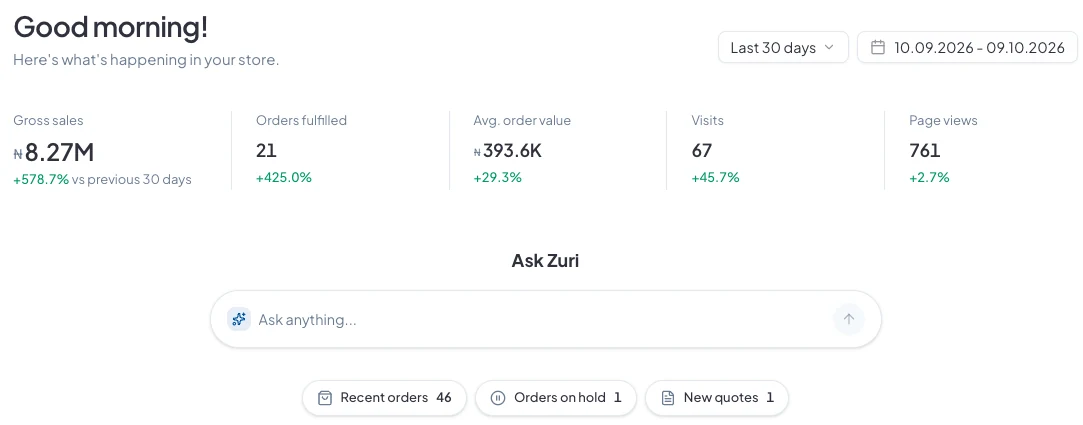
Your figures
Across the top you'll see Gross sales, Orders fulfilled, Avg. order value, Visits and Page views. Under each one is how it compares with the period before.
To change the period, use Last 30 days at the top right, or pick your own dates.
Ask Zuri
Type a question in plain language, like “How much did I sell this week?” or “Which products are low on stock?”, and Zuri answers from your store's own data. It can also tell you how to do anything in SalesCenta.
What needs your attention
Under Ask Zuri, the shortcuts take you straight to your Recent orders, Orders on hold and New quotes, with a count on each.
Further down, Tips and updates shows new features as we release them.
Getting around
- The menu on the left takes you to every part of SalesCenta. Click More at the bottom to see the rest, like Storefront, Store Setup and Team.
- Use the search bar at the top to find customers, orders, invoices and quotes. Press ⌘K (or Ctrl+K) to jump to it.
- The store name at the top left switches between your stores, if you have more than one.
- The icons at the top right open your live store in a new tab, your notifications and your settings.
Did this answer your question? Contact support if you need more help.