
Last updated 9 Oct 2026
When a signed-in customer adds products to their cart and leaves without paying, SalesCenta can email them a reminder of what they left behind.
Abandoned cart recovery is a plugin. If you don't see it in your sidebar, go to Plugins and turn on Abandoned cart recovery. See How do I turn features on and off with Plugins?
How it works
- A cart counts as abandoned an hour after the customer's last activity, if they haven't paid.
- The reminder email is sent automatically. You don't need to do anything.
- Only customers who were signed in get a reminder, because guests haven't given an email address.
- Each reminder uses one credit.
See your abandoned carts
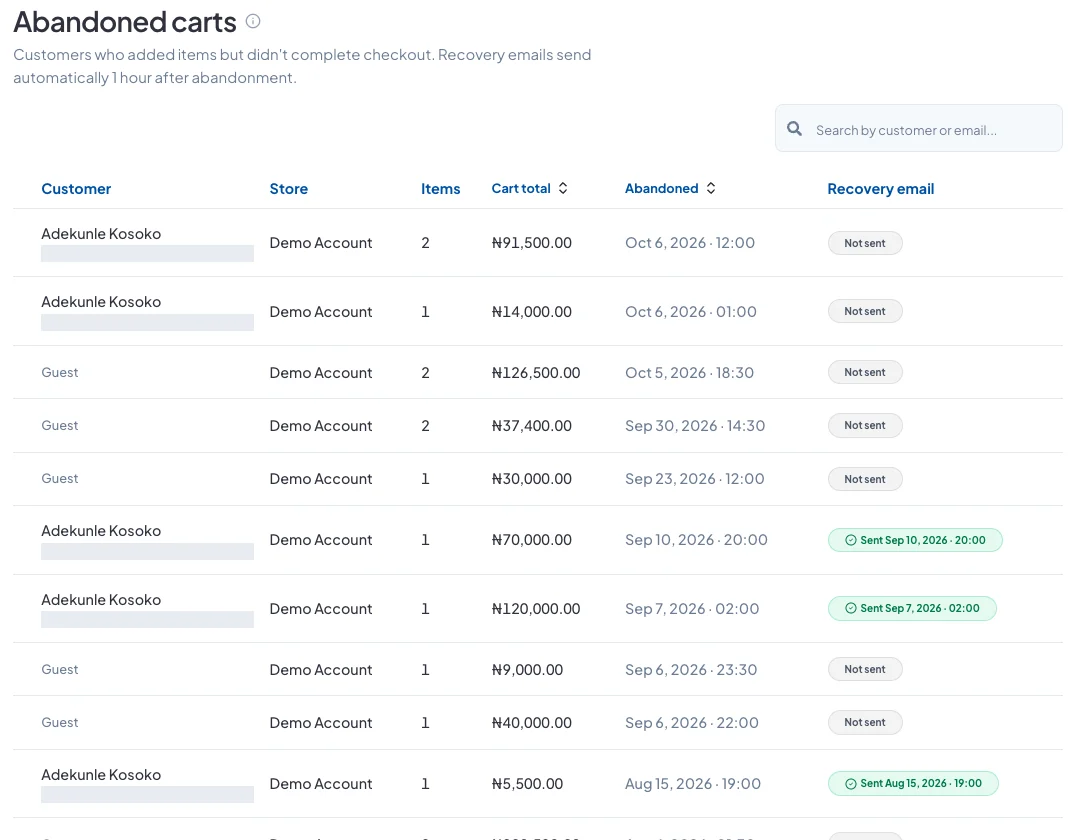
Go to Sales → Abandoned Carts. You'll see each cart's customer (or Guest), the number of items, the cart total, when it was abandoned and whether a reminder was sent.
Use the search box to find a customer by name or email.
Did this answer your question? Contact support if you need more help.