
Last updated 9 Oct 2026
Discount codes give customers money off at checkout: a percentage, a fixed amount or free delivery. You decide who can use them, how often, and for how long.
1. Create the code
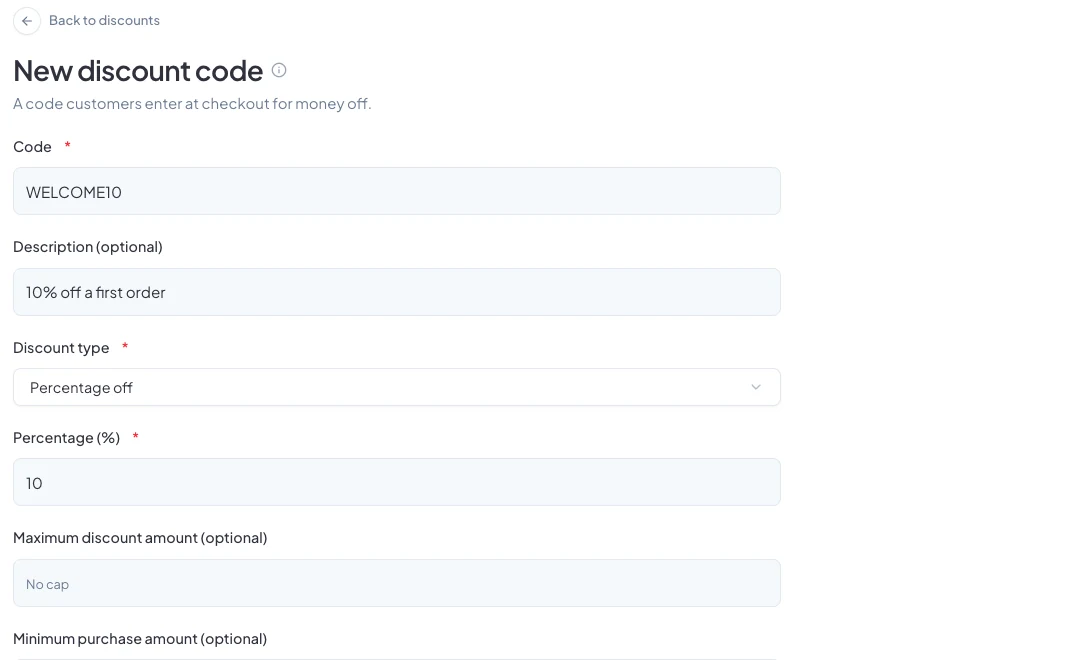
Go to Discounts in the sidebar and click Create Discount. Enter the Code customers will type, such as WELCOME10, and a Description so you remember what it's for.
2. Choose the discount
Pick a Discount type:
- Percentage off: for example 10%. Set a Maximum discount amount to cap it on big orders.
- Fixed amount off: a set amount off the order.
- Free shipping: removes the delivery fee.
3. Set the limits
- Minimum purchase amount: the code only works above this total.
- Total uses and Uses per customer: how many times it can be used.
- Who can use this code: all customers, or first-time customers only.
- Starts and Ends: when the code works.
Leave Active on and click Create discount.
4. Share it and track it
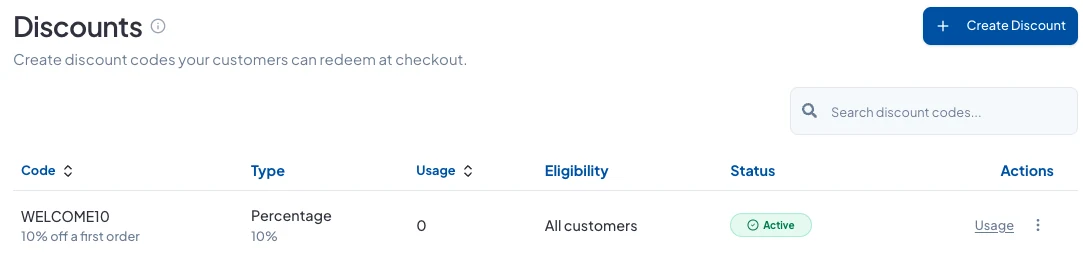
Share the code on WhatsApp, Instagram or in a campaign. The Discounts page shows how many times each code has been used.
Good to know
- Turn a code's Active switch off to stop it working without deleting it.
- The Analytics page shows the total value of discounts given.
Did this answer your question? Contact support if you need more help.