
Last updated 9 Oct 2026
Write posts that appear on a blog page on your store: a launch announcement, a how-to, a behind-the-scenes story. Posts can link to your products, which helps customers find them, including through Google.
Blog is a plugin. If you don't see it in your sidebar, go to Plugins and turn on Blog. See How do I turn features on and off with Plugins?
1. Write the post
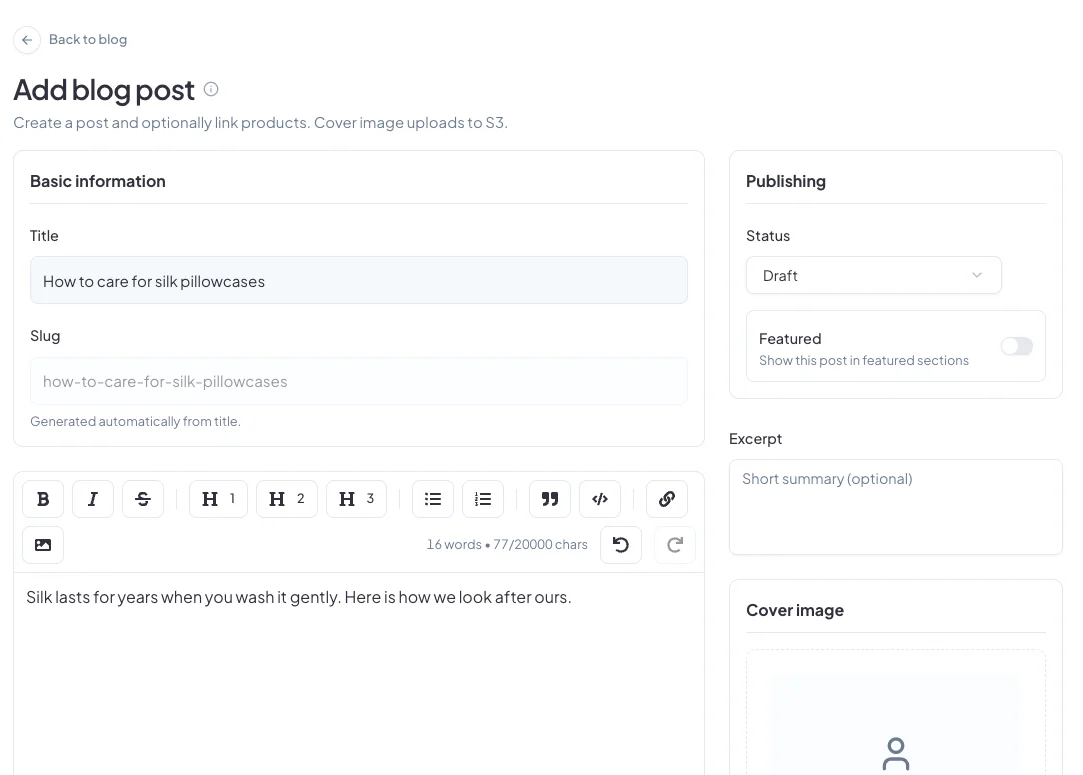
Go to Blog posts in the sidebar and click Add Post. Enter a Title; the web address (Slug) is filled in for you. Write the post in the editor, using headings, lists, links and images.
2. Add the finishing touches
- Excerpt: a short summary shown in your blog list.
- Cover image: upload one, or choose from your media library.
- Linked products: search and add the products the post mentions. The post also takes its categories from them.
- Featured: turn this on to show the post in featured sections.
3. Help it get found
In the SEO section, add a focus keyword, the phrase people would search for. The SEO Score checklist suggests improvements, like using the keyword in the title and writing at least 600 words. Click Edit Snippet to change how the post appears in Google.
4. Publish
Set Status to Publish to put the post live on your store's blog, or leave it as Draft to finish later. Click Create post.
Did this answer your question? Contact support if you need more help.